CaptionCraft guide
Closed captions vs subtitles (and SDH): what's the difference?
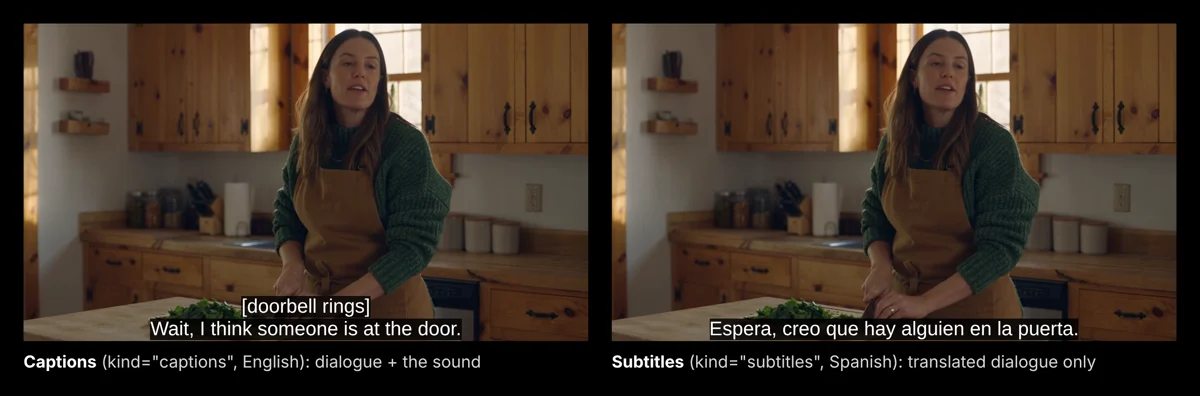
Closed captions are for viewers who can't hear the audio: they show the dialogue plus the sounds that matter, like [doorbell rings], in the same language as the video. Subtitles are for viewers who can hear but don't understand the language: they translate the dialogue only. SDH, subtitles for the deaf and hard of hearing, sits in between: caption content delivered as a subtitle track. Below: the differences side by side, a real frame with both tracks, and which one your video needs.
Updated November 24, 2026 · 6 min read
The short answer
The W3C's accessibility guidance describes captions as "a text version of the speech and non-speech audio information needed to understand the content", for people who are deaf or hard of hearing. It uses subtitles for "spoken audio translated into another language", and says subtitles are usually only the spoken audio, for people who can hear it but don't know the language.
So the difference is who the text is for. Captions replace the sound; subtitles replace the language. That's why W3C adds that captions are needed for accessibility, while subtitles in other languages are not directly an accessibility accommodation.
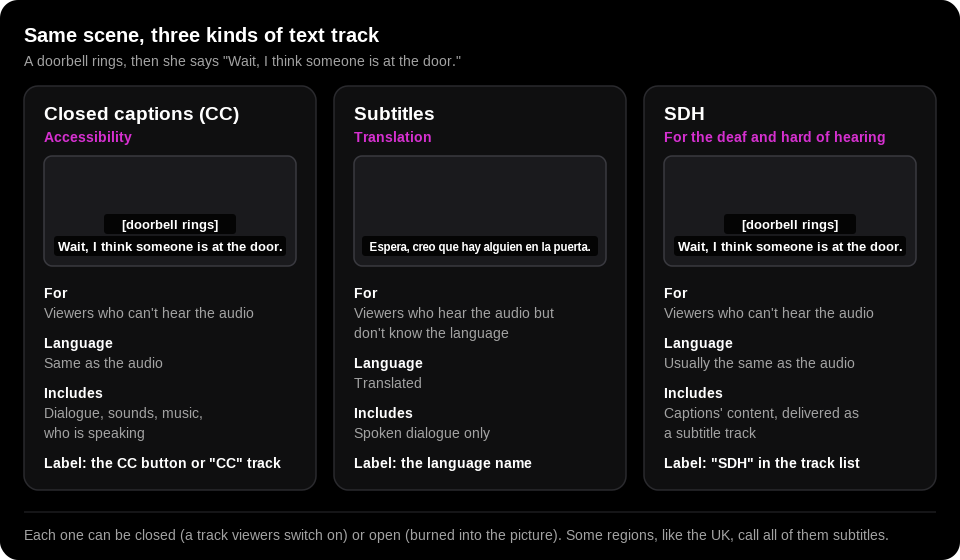
Closed captions vs subtitles vs SDH side by side
The words are confusing because people use them loosely. W3C notes that some regions use subtitles for both, and the BBC's subtitle guidelines describe "'closed' subtitles only, also known as 'closed captions'". Here is how the three differ when the terms are used strictly:
| Closed captions (CC) | Subtitles | SDH | |
|---|---|---|---|
| Made for | Viewers who can't hear the audio | Viewers who can hear but don't know the language | Viewers who can't hear the audio |
| Language | Same as the audio | Translated | Usually the same as the audio |
| Sounds and music | Yes, e.g. [doorbell rings] | No, dialogue only | Yes |
| Who is speaking | Yes, when it isn't clear on screen | No | Yes, when it isn't clear on screen |
| Where you meet it | The CC button on TV, YouTube and web players | A language list in the player | Streaming apps and iPhone settings, labeled SDH |
What closed captions include
Good captions describe everything a hearing viewer gets from the soundtrack, not just the words. WCAG lists sound effects, music, laughter and speaker identification as part of captions.
- Sound effects in brackets: Netflix's English (USA) style guide puts speaker IDs and sound effects in [ ], in lowercase, and asks for plot-pertinent sounds unless the picture already shows them.
- Speakers who can't be seen: the same guide uses labels like [man] or [woman] until a character is named, and only when the speaker can't be identified visually.
- Music and silence when they matter: for example [menacing electronic music plays], or a note that the music stops abruptly.
- The actual words: Netflix asks SDH writers not to paraphrase, and the BBC warns that simplifying for deaf viewers is "condescending" and frustrating for lip-readers.
What SDH means
SDH stands for subtitles for the deaf and hard of hearing. Netflix's style guide treats SDH as same-language ("intralingual") subtitles and gives them the caption rules above: brackets for sounds and speakers, and transcription close to the audio. Its separate section for translated subtitles has no sound labels.
In practice, SDH has the content of captions in the form of a subtitle track, so it shows up wherever a service lists subtitle languages. On an iPhone, Apple's user guide says you can choose "special accessible captions—such as subtitles for the deaf and hard of hearing (SDH)—if available", and turn on Settings → Accessibility → Subtitles & Captioning → Closed Captions + SDH to prefer them.
Is closed captioning better than subtitles?
Neither is better; they answer different needs. If someone watches with the sound off, or can't hear it, captions or SDH tell them about the doorbell, the laugh and the off-screen voice. If someone hears everything but speaks another language, translated subtitles are what they need, and sound labels would only get in the way.
Lots of people who use captions aren't deaf. The BBC's guidelines say around 10% of broadcast viewers use subtitles regularly, rising to 35% for some online content, and that most of them are not hard of hearing. Captions help on mute, in noisy places and with fast or accented speech.
Which one does your video need?
On a website, the HTML <track> element makes the distinction explicit: MDN lists kind="subtitles" (the default) and kind="captions" as separate values, which is how the frame above was made. Both tracks use WebVTT; if you have an SRT file, the SRT to VTT converter turns it into one.
- A video in one language, for anyone: captions with the important sounds. This is the accessibility baseline in WCAG.
- An audience in other countries: translated subtitles, one track or one export per language, on top of your captions.
- A streaming or film delivery: check the platform's spec. Netflix, for example, has separate rules for SDH and for translated subtitles.
- A social video that plays on mute: same-language captions burned into the picture, so they show in every feed and repost. Our open vs closed captions guide explains when burned-in text beats a CC track.
Making captions and subtitles in Canva
Canva's built-in Captions feature transcribes the speech in your video into same-language captions that download with the MP4, and Canva can also translate them; our guide to captions in other languages in Canva covers the language settings. If your video needs sound labels like [laughs], type them into the caption text yourself.
The CaptionCraft app in Canva transcribes speech in more than 100 languages into captions you can edit, then renders them into the video with one of 16 animated templates. It captions the language that's spoken; it doesn't translate. See how to add captions in Canva automatically for the steps, and check every line before you publish: W3C warns that automatic captions are not sufficient on their own.
Sources
- Captions/Subtitles (W3C Web Accessibility Initiative)
- Understanding Success Criterion 1.2.2: Captions (Prerecorded) (W3C Web Accessibility Initiative)
- English (USA) Timed Text Style Guide (Netflix Partner Help Center)
- Subtitle Guidelines (BBC)
- Display subtitles and captions on iPhone (Apple Support)
- <track>: The Embed Text Track element (MDN Web Docs)
- Manage caption settings (YouTube Help)
Frequently asked questions
Is closed captioning the same thing as subtitles?
Not strictly. Closed captions are same-language text with dialogue plus important sounds, for viewers who can't hear; subtitles usually translate the dialogue only. Some regions, like the UK, call both subtitles.
What does SDH mean on Netflix or Apple TV?
SDH means subtitles for the deaf and hard of hearing: a same-language subtitle track that also describes sounds and identifies speakers, like captions.
What's the difference between CC and SDH?
The content is the same idea: dialogue plus sounds and speaker labels. CC is usually reached through the player's CC button, while SDH usually appears as an option in the subtitle list.
What button is closed captioning?
Look for a CC button in the player. On YouTube, tap the video, then Closed captions (CC); if it's missing, the video has no caption track.
Why do so many people watch with captions on?
Captions help with muted autoplay, noisy places, fast or accented speech and following names. The BBC says most of its regular subtitle users aren't hard of hearing.
Can subtitles include sound effects?
Yes, if they're SDH or a translation of the captions. W3C notes that subtitles can be a translation of the caption content, including non-speech audio information.
Create captions directly in Canva
Generate, edit, style, preview, and export video captions with CaptionCraft.
Install CaptionCraft in Canva