CaptionCraft guide
What is a VTT file? WebVTT format, example and how to open one
A VTT file is a WebVTT (Web Video Text Tracks) file: a plain-text file of captions or subtitles with start and end times, made for video players on the web. It starts with the word WEBVTT, then lists each caption as a cue with its timing and text. Below: an annotated example, how it renders in a browser, how to open or make one, and how it differs from SRT.
Updated November 18, 2026 · 8 min read
The short answer
MDN describes WebVTT as a plain-text format for timed text tracks shown in sync with a <video> or <audio> element, such as closed captions and subtitles. The file has the extension .vtt, the MIME type text/vtt, and must be saved as UTF-8. It holds only words and timings, never the video.
You usually meet VTT files in three places: captions on a website's own video player, caption tracks you upload to platforms such as YouTube, and meeting transcripts downloaded from Zoom or Microsoft Teams.
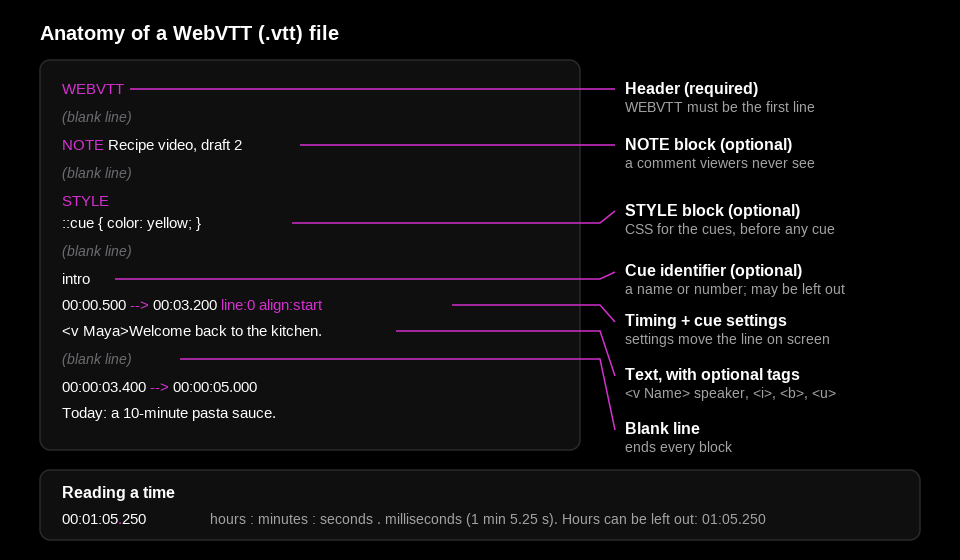
VTT file example, line by line
This is a complete, valid VTT file with two cues, as you'd see it in Notepad or TextEdit:
| Line in the file | What it is |
|---|---|
| WEBVTT | Header. Must be the first line of the file |
| (empty line) | Separates the header from what follows |
| 1 | Cue identifier: optional, any name or number |
| 00:00:00.500 --> 00:00:05.000 | Timing: shown from 0.5 s to 5 s |
| <v Maya>Welcome back to the kitchen. | Text, first line, with a voice tag naming the speaker |
| Today: a 10-minute pasta sauce.</v> | Text, second line |
| (empty line) | Ends the cue |
| 2 | Next cue identifier |
| 00:00:00.500 --> 00:00:05.000 line:0 position:4% align:start | Timing plus cue settings: this cue goes at the top left |
| [upbeat music] | Text of the second cue, a sound description |
What it looks like in a browser
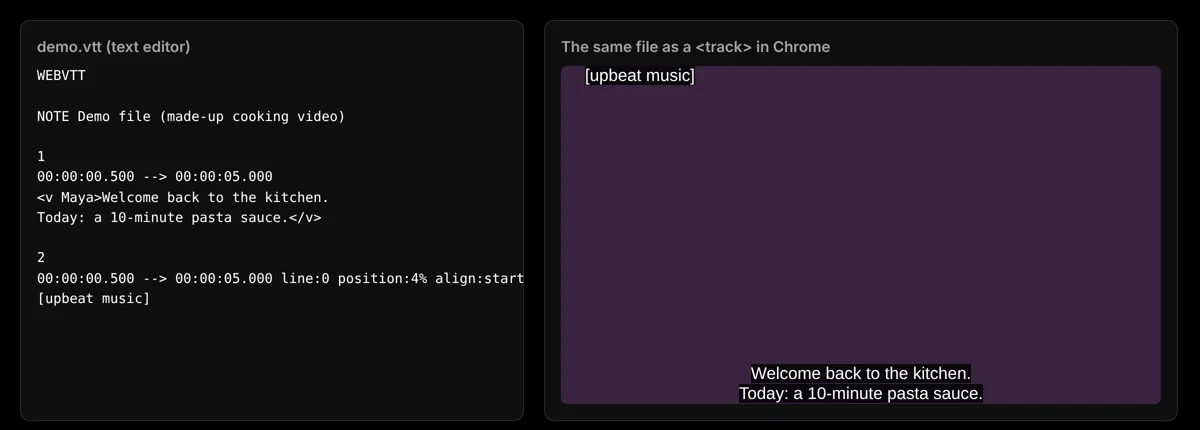
We loaded that exact file as a caption track on a plain demo video in Chrome. The first cue sits in the default place at the bottom. The second cue has the same times, so both show at once (WebVTT allows overlapping cues), and its cue settings put it at the top left, something SRT has no standard way to do.
The WebVTT format rules
These come from MDN's WebVTT reference. Break one and a browser may skip a cue or the whole file:
- The first line is WEBVTT. Text may follow it after a space (a title, for example), and only an invisible byte order mark may come before it.
- Leave a blank line after the header and after every block. A blank line inside a cue ends it early, so never put one between the timing line and the text.
- Times are hh:mm:ss.ttt or mm:ss.ttt, with a period before the milliseconds: 00:01:05.250 or 01:05.250.
- The arrow is -->, with a space on each side. The end time must be later than the start time, and cues must be in order of start time. Overlapping cues are allowed, except in chapter tracks.
- Cue settings go after the end time on the same line: line, position, size, align and vertical. They're lowercase, for example line:0 for the top line or position:10%.
- The text can't contain --> and can't use a bare & or <. Write & and < instead (MDN also recommends > for >).
- Tags include <b>, <i>, <u>, <v Name> for the speaker and in-cue timestamps for karaoke-style captions.
- NOTE blocks are comments for whoever edits the file; viewers never see them. STYLE blocks hold CSS for the cues and must come before the first cue.
What VTT files are used for
On your own website, a VTT file is the format the HTML <track> element uses. Its kind attribute says what the file is for: subtitles (the default), captions, descriptions, chapters or metadata. MDN notes that the file must come from the same origin as the page unless the video has a crossorigin attribute, and that a subtitles track needs a srclang language.
On YouTube, WebVTT is one of the supported caption formats. YouTube's help center says its support is an initial implementation: positioning works, but styling is limited to <b>, <i> and <u>, so CSS in STYLE blocks isn't used there.
In meetings, Zoom saves the audio transcript of a cloud recording as a separate VTT file, and Microsoft Teams lets organizers download a meeting transcript as .docx or .vtt. Those files are transcripts first: to read or share them, convert them to plain text with the VTT to TXT converter, which keeps speaker names and drops the timestamps.
How to open a VTT file
To read or edit it, open it with a plain-text editor: Notepad on Windows or TextEdit on a Mac. You'll see the header, the timings and the text exactly as in the example above.
To see the captions on a video, add the file as a caption track on the player or platform that plays the video. For a transcript you want in Word or Google Docs, paste it into the VTT to TXT converter first, so you don't have to delete every timestamp by hand.
How to create a VTT file
If you already have an SRT file, don't retype it: the SRT to VTT converter adds the header, switches the commas to periods and keeps every cue's text and timing. To write one from scratch:
- 1
Open a plain-text editor
Notepad, or TextEdit after Format → Make Plain Text. A word processor adds formatting that breaks the file.
- 2
Type WEBVTT, then a blank line
The header has to be the very first line.
- 3
Add each cue
An optional number or name, the timing line (00:00:00.500 --> 00:00:02.400), one or two lines of text, then a blank line.
- 4
Save it as UTF-8 with the .vtt extension
Name it, for example, my-video.vtt, choose UTF-8 encoding, and check that the editor didn't add .txt to the name.
- 5
Check it before you publish
Open it in our free SRT editor, which also reads VTT. It runs in your browser, flags overlaps and lines too long or fast to read, lets you set times while your video plays, and downloads a VTT that keeps your cue identifiers, settings and STYLE blocks.
VTT vs SRT
WebVTT grew out of SRT, so the cues look almost the same. Our guide to SRT files covers SRT in detail; here are the differences that matter:
| WebVTT (.vtt) | SRT (.srt) | |
|---|---|---|
| First line | WEBVTT | The first cue number |
| Milliseconds | After a period: 00:00:02.400 | After a comma: 00:00:02,400 |
| Hours in times | Optional (02.400 is fine as 00:02.400) | Always written |
| Cue numbers | Optional identifiers | Expected, in order |
| Position and styling | Cue settings, tags and STYLE blocks | A few tags, depending on the player |
| Website <track> captions | The format browsers use | Not accepted |
- Use VTT for your own website's player and wherever a platform asks for it; use SRT where a platform or editor only takes SubRip.
- Going the other way? The VTT to SRT converter removes the header, settings and VTT-only tags and renumbers the cues.
VTT files and Canva
Canva's own captions and the CaptionCraft app both put the captions into the exported MP4 as open captions, not into a separate VTT file, and we found no way to import a VTT or SRT into Canva's Captions panel. If you have a subtitle file and want its lines in a Canva video, our guide to adding subtitles in Canva shows the timed text box workaround.
Not sure which you need? Open vs closed captions explains when burned-in captions beat a VTT track, for example on social feeds where videos autoplay muted and get reposted.
Sources
- Web Video Text Tracks Format (WebVTT) (MDN Web Docs)
- <track>: The Embed Text Track element (MDN Web Docs)
- SubRip Subtitle format (SRT) (Library of Congress)
- Supported subtitle and closed caption files (YouTube Help)
- Edit or remove captions (YouTube Help)
- Using audio transcription for cloud recordings (Zoom Support)
- Start, stop, and download live transcripts in Microsoft Teams meetings (Microsoft Support)
- Work with HTML documents in TextEdit on Mac (Apple Support)
Frequently asked questions
What does VTT stand for?
Video Text Tracks, from WebVTT: Web Video Text Tracks, the caption format used by video and audio players on the web.
Is a VTT file the same as an SRT file?
Nearly. Both list timed captions in plain text, but a VTT file starts with WEBVTT, uses a period before the milliseconds and can position and style cues. Convert between them with the SRT to VTT and VTT to SRT converters.
How do I convert a VTT file to Word or text?
Paste it into the VTT to TXT converter to remove the header and timestamps, then copy the text into Word or Google Docs.
Can I convert an MP4 to a VTT file?
Not directly: a VTT file holds the words, so you need a transcript with timings first. Platform captions are a common starting point; YouTube Studio, for example, lets you download a video's subtitles, which you can then convert or edit.
Why isn't my VTT file working?
Check that WEBVTT is the first line, that times use a period before the milliseconds, that there's a blank line after every cue and none inside one, and that the file is saved as UTF-8 with a .vtt extension.
Create captions directly in Canva
Generate, edit, style, preview, and export video captions with CaptionCraft.
Install CaptionCraft in Canva