CaptionCraft guide
Subtitle guidelines: line length, timing and reading speed
Good subtitles follow a few rules that the big style guides mostly agree on: no more than two lines, about 37 to 42 characters per line, a reading speed of up to 17 to 20 characters per second (or 160 to 180 words per minute), and lines broken at natural points in the sentence. The exact numbers depend on who publishes them, so below are Netflix's, the BBC's and DCMP's rules side by side, then how to apply them, including on vertical video.
Updated November 13, 2026 · 6 min read
The rules at a glance
These are guidelines from three publishers, not one universal standard: Netflix's cover subtitles delivered to Netflix, the BBC's its programmes and online video, and DCMP's captioned educational media. A dash means the page we read gives no number.
| Rule | Netflix (English, USA) | BBC Subtitle Guidelines | DCMP Captioning Key |
|---|---|---|---|
| Lines per subtitle | 2 at most; usually 1 unless the text is too long | 2 for 16:9, 4:3 and 1:1 video; 3 for vertical 9:16 | – |
| Line length | 42 characters | 37 characters on broadcast; online, 68% of the width of 16:9 video or 90% of 9:16 video (about 25 characters) | – |
| Reading speed | Up to 20 characters a second (adults), 17 (children's programs) | 160–180 words a minute, about 0.33–0.375 s per word | Up to 130, 140 or 160 words a minute for lower, middle and upper-level educational media |
| Time on screen | At least 5/6 of a second, at most 7 seconds | At least about 0.3 s per word, e.g. 1.2 s for 4 words | – |
| Sync with speech | – | Don't appear more than 1.5 s early or stay more than 1.5 s after speech; never more than 2 s late | May start or end up to 15 frames from the audio |
| Line breaks | After punctuation, before conjunctions and prepositions; bottom-heavy shape | At punctuation; don't split article and noun, pronoun and verb, or parts of a verb | – |
How to write subtitles, step by step
Whether you type subtitles from scratch or clean up automatic captions, the work is the same:
- 1
Start from an accurate transcript
Automatic captions save typing, but check every name, number and negative: W3C notes that automatic captions often need significant editing, and a missing "not" reverses the meaning. DCMP's first quality rule is simply that captions are accurate.
- 2
Aim for one sentence per subtitle
The BBC recommends one complete sentence per subtitle. Split long sentences at a clause boundary; very short ones can share a subtitle.
- 3
Keep lines short and break them well
Stay within 42 characters a line (37 if you follow the BBC's broadcast limit). When the text needs two lines, break after punctuation or before a conjunction or preposition, and never between an article and its noun, a first and last name, or a pronoun and its verb. Netflix prefers a bottom-heavy shape: a shorter top line, but not just one or two words on it.
- 4
Check the reading speed and edit if it's too fast
Divide the characters (with spaces) by the seconds on screen. Over 20 a second, cut words rather than squeezing time: DCMP's examples drop repeats and fillers ("It is really, really difficult" becomes "It is really difficult") while keeping the meaning and key vocabulary.
- 5
Time each subtitle to the speech
Start it when the person starts speaking and end it shortly after they stop. Keep every subtitle between 5/6 of a second and 7 seconds. If you leave a gap during a pause, the BBC says to make it at least one second, preferably 1.5: anything shorter looks jerky.
- 6
Add what viewers can't hear, if these are captions
Captions for deaf and hard-of-hearing viewers also describe sounds and speakers. DCMP puts sound effects in brackets, such as [dog whimpering], and identifies off-screen speakers. Subtitles meant only to translate the dialogue for hearing viewers don't need them. Our open vs closed captions guide explains the difference.
A worked example
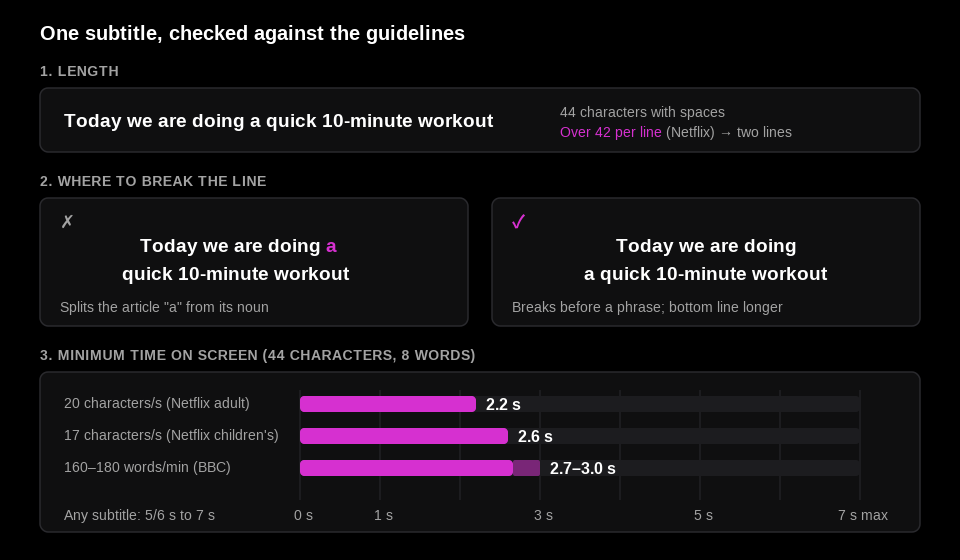
Take the line "Today we are doing a quick 10-minute workout". It's 44 characters with spaces, two more than Netflix's 42, so it needs two lines. Breaking it as "Today we are doing a / quick 10-minute workout" leaves the article "a" stranded from its noun; "Today we are doing / a quick 10-minute workout" keeps the phrase together and puts the longer line at the bottom.
How long must it stay up? At 20 characters a second, 44 characters need 2.2 seconds; at Netflix's 17 for children's programs, about 2.6 seconds. Counted the BBC's way, its 8 words at 160–180 words a minute need 2.7 to 3 seconds. The two methods don't agree exactly, which is why the guides give ranges.
Subtitle rules for vertical social video
Most style guides were written for wide TV and streaming screens. Vertical video is narrower, so lines must be shorter: the BBC's guidelines allow three lines on 9:16 video and estimate that a line 90% of the frame wide fits about 25 characters, roughly two-thirds of a landscape line.
Social platforms also cover the bottom of the frame with buttons and descriptions, so place captions where the app's interface won't hide them; our TikTok safe zone and Instagram Reels safe zone checkers show the covered areas. And many creators burn in captions that show one to a few words at a time, often with the spoken word highlighted, like the karaoke captions style. That's a design choice the TV guidelines don't cover; the same principles still apply: accurate words, in sync, on screen long enough to read.
Check a subtitle file against these rules
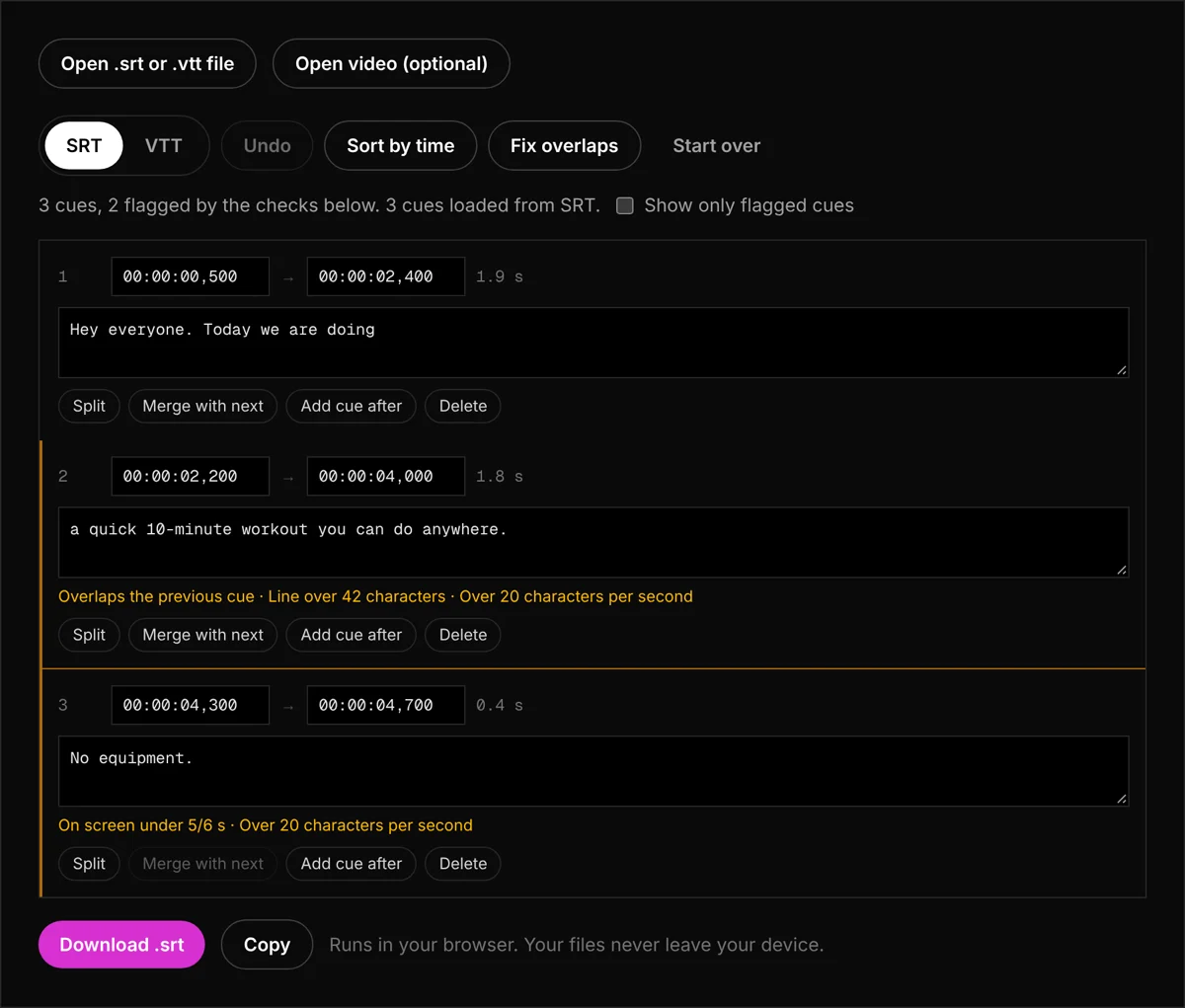
Our free SRT editor runs in your browser and flags each subtitle that overlaps the next, has more than two lines, a line over 42 characters, more than 20 characters a second (spaces included), or stays up less than 5/6 of a second or more than 7 seconds. Split, merge and retime lines right there, then download the SRT or VTT. New to the format? Start with what an SRT file is.
For captions burned into a Canva video, the CaptionCraft app's Styles tab has line count and text width settings that apply to every caption at once, so you can keep them all to one or two short lines; you can still edit the text and timing of each caption in its Subtitles tab first. Its caption templates show how each style looks.
Sources
- English (USA) Timed Text Style Guide (Netflix Partner Help Center)
- Timed Text Style Guide: General Requirements (Netflix Partner Help Center)
- Subtitle Guidelines (BBC)
- Captioning Key: Presentation Rate (DCMP)
- Captioning Key: Elements of Quality Captioning (DCMP)
- Captioning Key: Sound Effects and Music (DCMP)
- Captions/Subtitles (W3C WAI)
Frequently asked questions
How many characters per line should subtitles have?
Usually 37 to 42. Netflix's English guide allows 42 characters per line; the BBC uses 37 on broadcast and, for vertical online video, about 25 characters across 90% of the frame.
How many lines can a subtitle have?
Two at most for normal widescreen video, and one when the text fits. The BBC allows three lines on vertical 9:16 video.
How long should a subtitle stay on screen?
Long enough to read it: Netflix requires at least 5/6 of a second and at most 7 seconds per subtitle, and the BBC suggests about 0.3 seconds per word as a minimum.
What is a good reading speed for subtitles?
Up to 20 characters per second for adults and 17 for children's programs (Netflix), or 160 to 180 words per minute (BBC). DCMP sets lower limits, 130 to 160 words a minute, for educational media.
Should subtitles be word for word?
As close as reading speed allows. The BBC notes viewers prefer verbatim subtitles; when speech is too fast, Netflix and DCMP favor cutting repeats and fillers while keeping the meaning.
Do subtitle rules apply to TikTok and Reels captions?
The principles do (accurate, in sync, readable), but the numbers were written for TV. Vertical video needs shorter lines, and captions must avoid the areas the app's buttons cover.
Create captions directly in Canva
Generate, edit, style, preview, and export video captions with CaptionCraft.
Install CaptionCraft in Canva